S1D-Rama
APERO-style conversion from 2D extracted echelle orders (s2d / e2ds FITS) to a merged 1D spectrum (s1d FITS table). Conversion à la APERO d'ordres échelle 2D extraits (FITS s2d / e2ds) vers un spectre 1D fusionné (table FITS s1d).
Why this existsPourquoi cet outil existe
Many analyses need a single 1D spectrum, but reduced echelle products are naturally 2D (order × pixel). S1D-Rama provides a transparent, script-level implementation of the APERO order-merging logic used to build 1D spectra. Bien des analyses ont besoin d'un spectre 1D unique, mais les produits échelle réduits sont naturellement en 2D (ordre × pixel). S1D-Rama offre une implémentation transparente, au niveau du script, de la logique de fusion des ordres d'APERO utilisée pour construire des spectres 1D.
What this doesCe que ça fait
InputEntrée
An s2d FITS file (*t.fits) from which S1D-Rama extracts:
Un fichier FITS s2d (*t.fits) dont S1D-Rama extrait :
- 2D flux image per orderImage de flux 2D par ordre
- 2D wavelength map per orderCarte de longueur d'onde 2D par ordre
- 2D blaze function per orderFonction blaze 2D par ordre
OutputSortie
FITS binary table extension named S1D with the following columns:
Extension de table binaire FITS nommée S1D, avec les colonnes suivantes :
| ColumnColonne | UnitUnité | DescriptionDescription |
|---|---|---|
wavelength | nm | Common observed-frame wavelength gridGrille de longueur d'onde commune, référentiel observé |
flux | — | Native flux at observed wavelengthFlux natif à la longueur d'onde observée |
eflux | — | Flux uncertaintyIncertitude sur le flux |
flux_zerovel | — | Flux shifted to stellar rest frame (BERV + vsys)Flux décalé dans le référentiel au repos de l'étoile (BERV + vsys) |
eflux_zerovel | — | Flux uncertainty for zero-velocity fluxIncertitude sur le flux à vitesse nulle |
weight | — | Merge weight from blaze functionPoids de fusion dérivé de la fonction blaze |
AlgorithmAlgorithme
APERO-style order merging in seven steps:Fusion des ordres à la APERO en sept étapes :
- Build target 1D wavelength grid (uniform in velocity).Construire la grille de longueur d'onde 1D cible (uniforme en vitesse).
- Build edge taper weights per order so order ends fade in/out smoothly.Construire des poids de lissage de bord par ordre, pour que les extrémités s'estompent en douceur.
- Multiply flux and blaze by the edge taper.Multiplier le flux et la fonction blaze par le lissage de bord.
- Spline each order onto the target 1D grid.Interpoler (spline) chaque ordre sur la grille 1D cible.
- Combine overlapping orders using the blaze as weight.Combiner les ordres qui se chevauchent en utilisant la fonction blaze comme poids.
- Normalize by total weight in each wavelength bin.Normaliser par le poids total dans chaque intervalle de longueur d'onde.
- Write merged vectors to FITS.Écrire les vecteurs fusionnés dans un fichier FITS.
Velocity correctionCorrection de vitesse
S1D-Rama automatically reads the barycentric Earth radial velocity (BERV) and target systemic velocity from the FITS header and computes a rest-frame flux on the common wavelength grid. S1D-Rama lit automatiquement la vitesse radiale barycentrique terrestre (BERV) et la vitesse systémique de la cible dans l'en-tête FITS, puis calcule un flux au repos sur la grille de longueur d'onde commune.
| Header keywordMot-clé d'en-tête | ExtensionExtension | MeaningSignification |
|---|---|---|
BERV | ext 1 | Barycentric Earth radial velocity (km/s)Vitesse radiale barycentrique terrestre (km/s) |
ESO TEL TARG RADVEL | ext 0 | Target systemic velocity (km/s)Vitesse systémique de la cible (km/s) |
flux_zerovel(λ) = flux(λ / doppler_factor).
Both the observed and rest-frame fluxes are written on the same wavelength grid, enabling
direct co-addition and template matching across epochs.
Correction Doppler relativiste : β = vtotal/c,
doppler_factor = √[(1 − β)/(1 + β)].
Le flux est ensuite interpolé : flux_zerovel(λ) = flux(λ / doppler_factor).
Les flux observé et au repos sont tous deux écrits sur la même grille de longueur d'onde, ce qui permet
une co-addition directe et un appariement de gabarits (template matching) entre époques.
Quick startDémarrage rapide
1 · Clone and enter the repo1 · Cloner le dépôt et s'y placer
git clone https://github.com/eartigau/s1drama
cd s1drama
Already have the repo?Vous avez déjà le dépôt ?
git pull --ff-only2 · Install dependencies2 · Installer les dépendances
Requires: numpy ≥ 1.26, scipy ≥ 1.11, astropy ≥ 6.0, matplotlib ≥ 3.8, PyYAML ≥ 6.0.
Requiert : numpy ≥ 1.26, scipy ≥ 1.11, astropy ≥ 6.0, matplotlib ≥ 3.8, PyYAML ≥ 6.0.
python3 -m venv .venv
source .venv/bin/activate
python -m pip install --upgrade pip
python -m pip install -r requirements.txt
conda create -n s1drama python=3.12 -y
conda activate s1drama
python -m pip install --upgrade pip
python -m pip install -r requirements.txtpython -m pip install -r requirements.txt3 · Run on your FITS file3 · Traiter votre fichier FITS
python mk1d.py --make-plots data/NIRPS.2023-08-29T01:33:35.188t.fitsProcess many files with a wildcard (quote to let Python expand it):Traiter plusieurs fichiers avec un caractère générique (entre guillemets pour laisser Python l'étendre) :
python mk1d.py "data/*.fits"Force reprocessing of already-existing outputs:Forcer le retraitement des sorties déjà existantes :
python mk1d.py --force "data/*.fits"Expected productsProduits attendus
products/s1d/NIRPS.2023-08-29T01:33:35.188t_s1d_apero.fits
docs/figures/NIRPS.2023-08-29T01:33:35.188t_fig1_e2ds.png
docs/figures/NIRPS.2023-08-29T01:33:35.188t_fig2_edge_taper.png
docs/figures/NIRPS.2023-08-29T01:33:35.188t_fig3_s1d.png
docs/figures/NIRPS.2023-08-29T01:33:35.188t_fig4_overlap_zoom.png
4 · Inspect output quickly4 · Inspecter rapidement la sortie
python - <<'PY'
from astropy.io import fits
p='products/s1d/NIRPS.2023-08-29T01:33:35.188t_s1d_apero.fits'
with fits.open(p) as h:
    print('HDUS', len(h))
    print('EXT1', h[1].name)
    print('COLS', h[1].columns.names)
    print('NROWS', len(h[1].data))
PYConfigurationConfiguration
All tunables live in config/s1drama.yaml. This file controls:
Tous les paramètres ajustables se trouvent dans config/s1drama.yaml. Ce fichier contrôle :
- FITS extension names (flux / wave / blaze)Noms des extensions FITS (flux / wave / blaze)
- Output directory and filename suffixRépertoire de sortie et suffixe de nom de fichier
- Merge constants (wavelength limits, binning, blaze threshold, edge smoothing)Constantes de fusion (limites de longueur d'onde, binning, seuil blaze, lissage des bords)
- Plot defaultsParamètres par défaut des graphiques
Supply an alternative config at runtime:Fournir une configuration alternative à l'exécution :
python mk1d.py --config config/s1drama.yaml data/your_file.fitsCLI referenceRéférence CLI
python mk1d.py --help| FlagOption | DescriptionDescription |
|---|---|
--make-plots | Generate documentation/debug figuresGénérer les figures de documentation/débogage |
--fig-dir | Choose where figures are writtenChoisir où les figures sont écrites |
--output-dir | Override YAML output directoryRemplacer le répertoire de sortie du YAML |
--force | Overwrite already-processed outputsÉcraser les sorties déjà traitées |
--output | Custom single-file output path (single input only)Chemin de sortie personnalisé pour un seul fichier (entrée unique seulement) |
--config | Path to alternative YAML config fileChemin vers un fichier de configuration YAML alternatif |
FiguresFigures
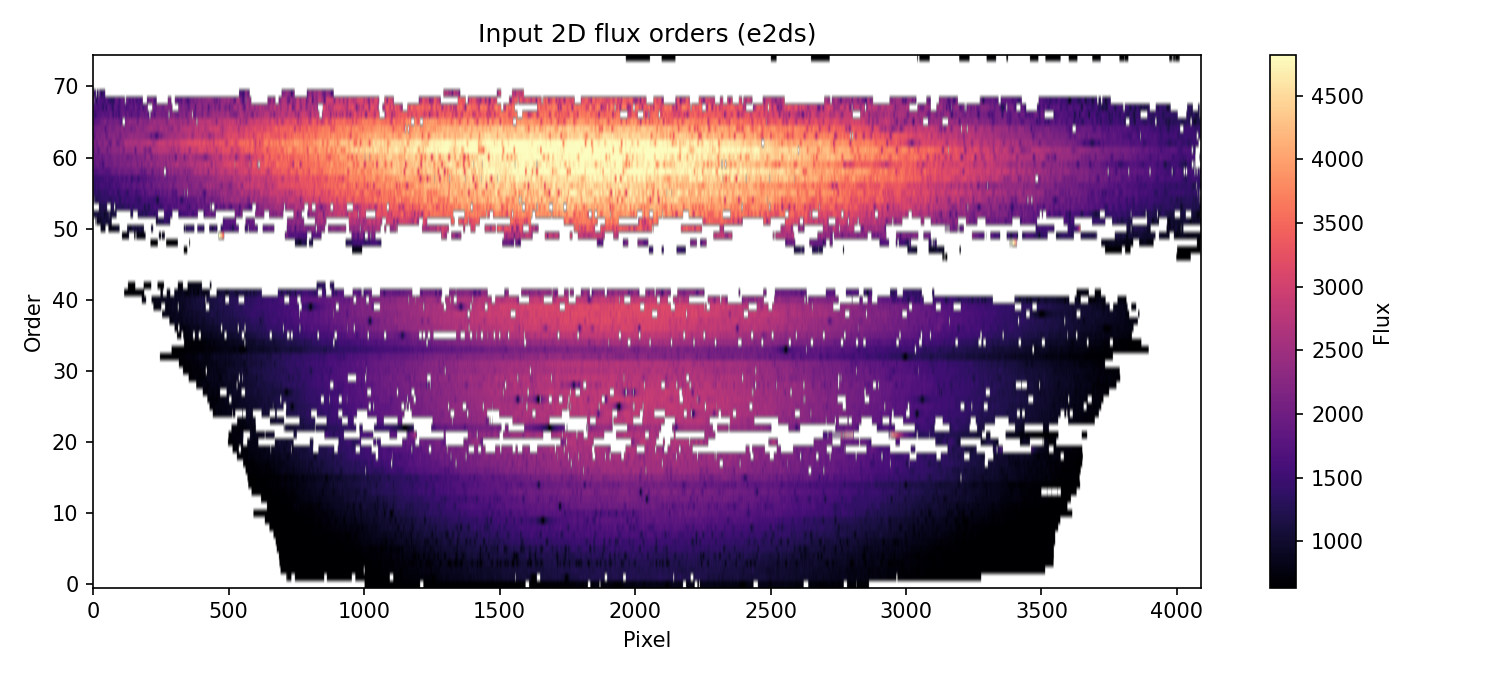
Fig 1 — Input 2D flux image per echelle orderImage de flux 2D en entrée, par ordre échelle
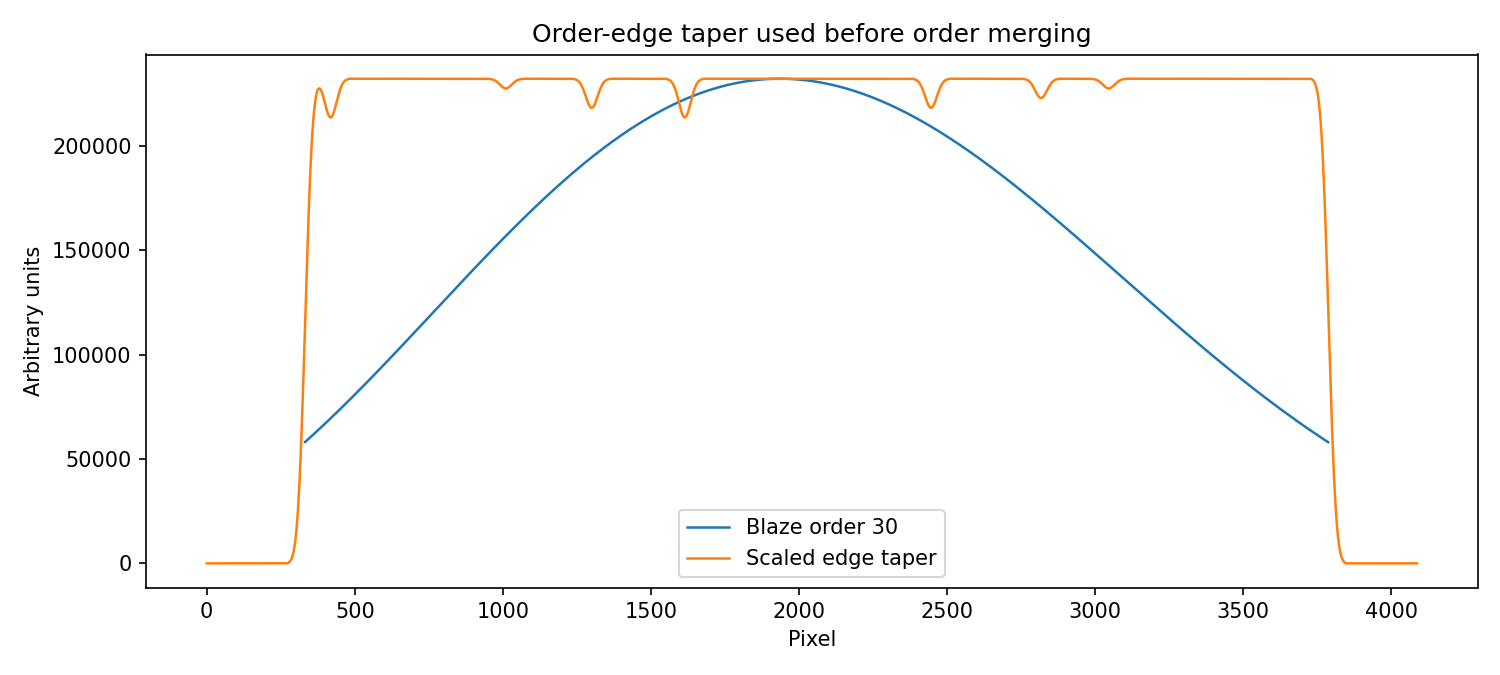
Fig 2 — Example order-edge taper for smooth blending at order boundariesExemple de lissage de bord d'ordre pour un raccord doux aux frontières entre ordres
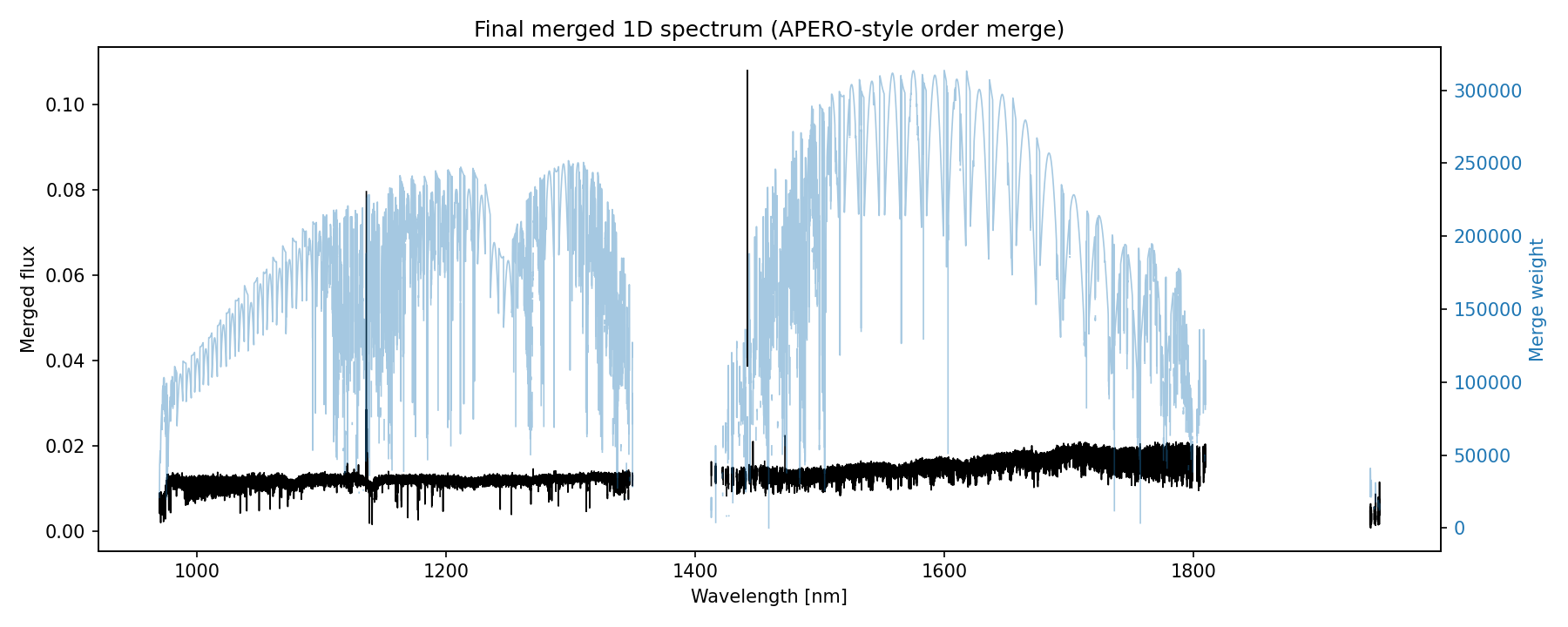
Fig 3 — Final merged 1D spectrum and merge weight as a function of wavelengthSpectre 1D fusionné final et poids de fusion en fonction de la longueur d'onde
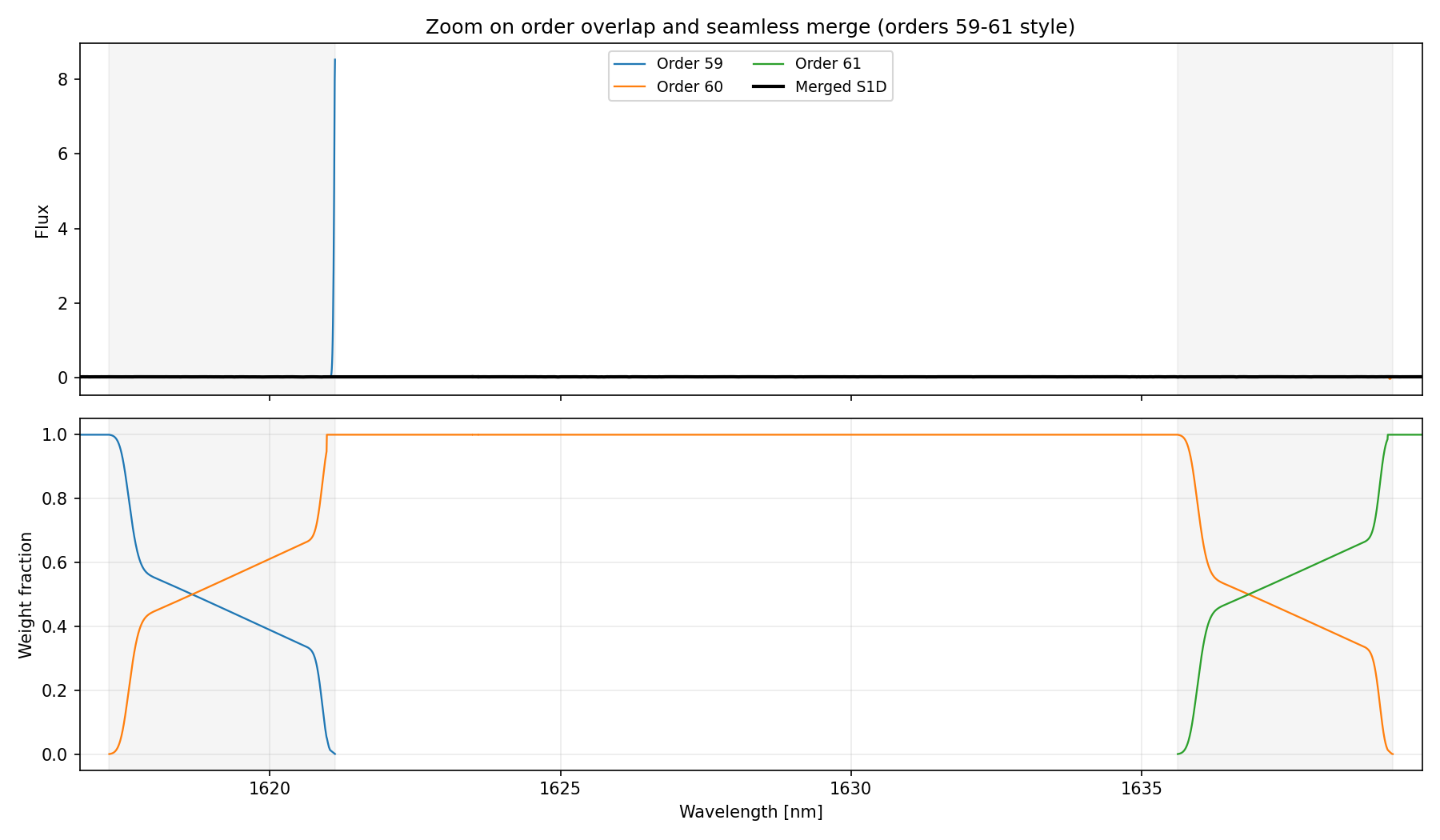
Fig 4 — Zoom on the overlap between orders 59–61. Color-coded order spectra are shown together with the merged S1D. The lower panel shows each order's weight fraction, making the transition at order boundaries explicit and demonstrating the seamless handoff in overlap regions. Zoom sur le chevauchement entre les ordres 59–61. Les spectres des ordres, codés par couleur, sont montrés avec le S1D fusionné. Le panneau du bas montre la fraction de poids de chaque ordre, rendant explicite la transition aux frontières entre ordres et démontrant la continuité du raccord dans les zones de chevauchement.
Fidelity vs. full APERO pipelineFidélité par rapport au pipeline APERO complet
S1D-Rama reproduces the merge logic from APERO's e2ds_to_s1d function.
It is intentionally a standalone implementation and does not run the full APERO
reduction chain (calibrations, extraction, telluric recipes, database interactions, etc.).
S1D-Rama reproduit la logique de fusion de la fonction e2ds_to_s1d d'APERO.
Il s'agit délibérément d'une implémentation autonome, qui n'exécute pas la chaîne de
réduction APERO complète (calibrations, extraction, recettes telluriques, interactions avec la base de données, etc.).
References & attributionRéférences et attribution
Please cite APERO (Cook et al. 2022) when this method is used in scientific work. Veuillez citer APERO (Cook et al. 2022) lorsque cette méthode est utilisée dans un travail scientifique.
| ItemÉlément | LocationEmplacement |
|---|---|
| Core paperArticle principal | Cook et al. (2022), PASP — ADS link (§ 7.6, Fig. 21) |
| APERO codeCode APERO | apero/science/extract/gen_ext.py → e2ds_to_s1d |
| NIRPS constantsConstantes NIRPS | apero/instruments/nirps_ha/constants.pyapero/instruments/nirps_he/constants.py |