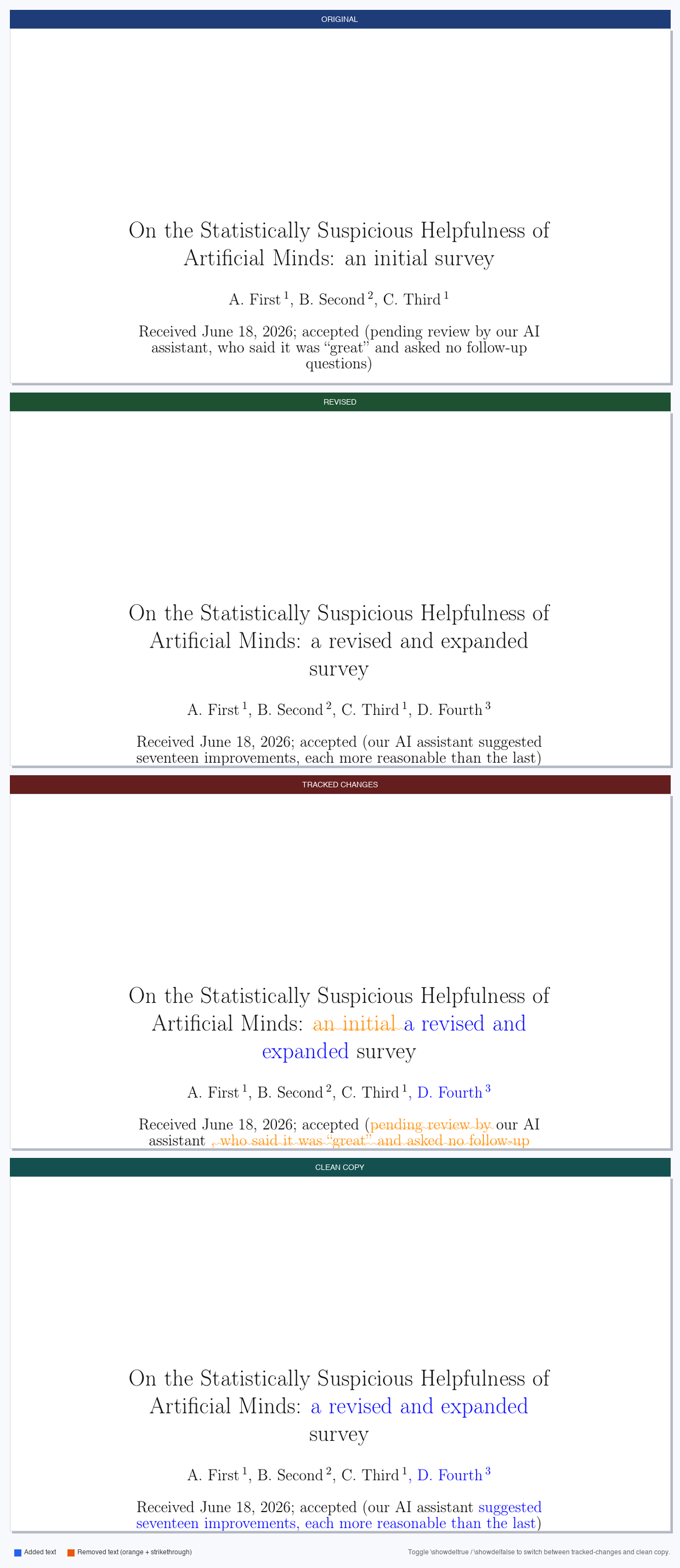
What problem does this solve?
When resubmitting a journal article after referee comments, most journals ask you to provide a version with tracked changes so reviewers can immediately see what changed. Creating that document by hand is tedious and error-prone.
latex_updates automates the entire pipeline: it cleans your
source files, runs latexdiff with journal-appropriate settings,
injects consistent colour definitions, and compiles the PDF — all with one
command. The result is a professional tracked-changes document where every
addition is highlighted in blue and
every deletion is shown in
orange with a wavy strikethrough.
A one-line toggle in the output file lets you switch between the referee version (showing all deletions) and a clean resubmission copy (deletions hidden) without re-running anything.
Installation
latex_updates command is available
anywhere in your terminal — no need to be in the script directory or activate an environment.
1 — Install the Python package
# Recommended: install directly from GitHub
$ pip install git+https://github.com/eartigau/latex-updates.git

# Alternative: clone and install locally
$ git clone https://github.com/eartigau/latex-updates.git
$ pip install ./latex-updates
2 — Install latexdiff
latexdiff is the underlying word-level diff engine.
Install it once for your system:
# macOS
$ brew install latexdiff

# Debian / Ubuntu
$ sudo apt install latexdiff

# TeX Live (any platform)
$ tlmgr install latexdiff
3 — pdflatex (optional)
pdflatex is needed only for automatic PDF compilation.
If it is absent, latex_updates still produces the
.tex diff file and prints the command to compile it manually.
pdflatex comes with any standard TeX distribution (TeX Live,
MiKTeX, MacTeX).
If your manuscript uses A&A style (\documentclass{aa}),
latex_updates will automatically search for aa.cls
on your system and use it. If it is not found in your TeX path, install it
with tlmgr install aa (TeX Live) or
sudo apt install texlive-publishers (Debian/Ubuntu).
Quick start
The repository includes two demo manuscripts so you can try the tool immediately after cloning:
$ git clone https://github.com/eartigau/latex-updates.git
$ latex_updates latex-updates/demo/demo_old.tex \
               latex-updates/demo/demo_new.tex

latex_updates: generating diff between
  old: demo/demo_old.tex
  new: demo/demo_new.tex

  Cleaning demo_old.tex ...
  Cleaning demo_new.tex ...
  Running latexdiff...
  Inserting colour definitions and toggle...

  Diff source → demo/diff_demo_new.tex
  Compiling PDF (2 passes)...
  Diff PDF    → demo/diff_demo_new.pdf

Done.
Open demo/diff_demo_new.pdf to see the tracked-changes output.
Usage
latex_updates OLD.tex NEW.tex [options]| Argument / option | Description |
|---|---|
OLD.tex |
Previous version of the manuscript (submitted version) |
NEW.tex |
Revised version of the manuscript (post-referee version) |
-o FILE / --output FILE |
Custom output filename. Default: diff_<NEW>.tex in the same directory as the inputs. |
--no-compile |
Produce the .tex diff file only; skip pdflatex compilation. |
Examples
# Typical use — produces diff_v2_paper.tex + diff_v2_paper.pdf
$ latex_updates v1_paper.tex v2_paper.tex

# Name the output for sending to a referee
$ latex_updates old.tex new.tex -o changes_for_referee.tex

# Generate the .tex only, compile later by hand
$ latex_updates old.tex new.tex --no-compile
$ pdflatex diff_new.tex
Show or hide deleted text
Every generated .tex file contains a toggle near the top.
Edit one word and recompile — no other changes needed:
Show deleted text — default, for the referee response letter
\newif\ifshowdel
\showdeltrue   % deleted text appears in orange with wavy strikethrough
Hide deleted text — clean copy for the resubmission itself
\newif\ifshowdel
\showdelfalse  % deleted text is completely invisible
This means the same .tex file produces two different documents
depending on that one flag — handy when you need both the annotated version
for the referee and a clean version for the journal submission system.
Journal support
latex_updates reads the \documentclass line of
your manuscript and automatically applies the right latexdiff
options for that journal. No flags, no configuration files.
| Journal | Detected class | What is handled automatically |
|---|---|---|
| Astronomy & Astrophysics (A&A) | \documentclass{aa} |
A&A's \abstract command takes five arguments
(context · aims · methods · results · conclusions).
Standard latexdiff would break on this; latex_updates
treats it as a block-level command so deleted abstracts compile cleanly.
\subtitle and section headings are excluded from
word-level diffing.
|
| AASTeX (ApJ, AJ, ApJL, PASP) | \documentclass{aastex63} etc. |
Author-metadata commands
(\affiliation, \correspondingauthor,
\email, \received, …)
are excluded from word-level diffing; they contain structured arguments
that latexdiff cannot safely split.
|
| Monthly Notices of the RAS (MNRAS) | \documentclass{mnras} |
Uses a standard abstract environment — no special handling needed. |
| Any other class | — | Generic mode: standard latexdiff with math-mode protection. |
Missing your journal? Open an issue — adding a profile is a few lines of Python.
How it works
Clean the old file
Strip {\bf …} and \textbf{…} markup
that was manually added during earlier revision rounds to highlight changes.
Clean the new file
Remove leftover bare { } groups and normalise
LaTeX spacing commands that confuse latexdiff's parser.
Run latexdiff
Word-level diff with math-mode protection and journal-specific options applied automatically.
Inject colour & toggle
Blue additions, orange wavy-strikethrough deletions,
and a \showdel flag — inserted before \begin{document}.
Compile PDF
Two pdflatex passes resolve cross-references
and generate the final PDF automatically.
Colour legend
Blue = added text · Orange strikethrough = removed text
Demo manuscripts
The demo/ folder contains two versions of a short mock paper
(On the Statistically Suspicious Helpfulness of Artificial Minds)
written to exercise as many diff scenarios as possible in a compact document.
| File | What it contains |
|---|---|
demo/demo_old.tex |
Original submission: 3 authors · title · abstract with inline math · 4 sections · numbered list (3 items) · table with 4 data rows · bibliography |
demo/demo_new.tex |
Revised version: 4th author added · title reworded · abstract numbers updated · 4th list item added · extra table row · new subsection · full new Discussion section · extended bibliography |
Together the two files cover the most common revision scenarios: inline text edits, math value changes, structural additions (new author, list item, table row, whole section) — making them a practical smoke-test for any LaTeX diff workflow.